For tax functions that own the number.

Two to 500+ entities. Consolidated groups and MECs. Any ERP. Australian-only groups through to groups with foreign subsidiaries. If you prepare, review or sign off the provision and the return, this page is about you.

The organisation

You’ll recognise yourself

The group

Australian-headquartered, listed or large private

A consolidated tax group or MEC. Australian-only groups through to groups with foreign subsidiaries, from a handful of entities to several hundred.

The entities

Two to 500+ legal entities

Active and dormant. Priced as active or passive, so a holding company never costs what an operating company does.

The team

Two to twenty people who own the number

A Head of Tax or Group Tax Manager who signs, and the preparers and reviewers who get there. Finance feeds the GL. The board reads the result.

The systems

One ERP or several, and a chart of accounts never designed for tax

TaxTime reads the general ledger as it is. No tax-sensitive chart of accounts and no restructure before you start.

The advisers

A Big Four or mid-tier firm in the mix

You’d rather they had your Tax Ledger than your spreadsheets. They get a login on request, and the platform and the data stay yours.

The governance

A Justified Trust review in view

The ATO wants evidence, not assurance. Every figure traces from the disclosure to the source line, with who did what and when.

The people

What changes for the people doing the work.

Same team, same deadlines. This is what the close looks like now, and what it looks like with TaxTime, for the three people who carry it.

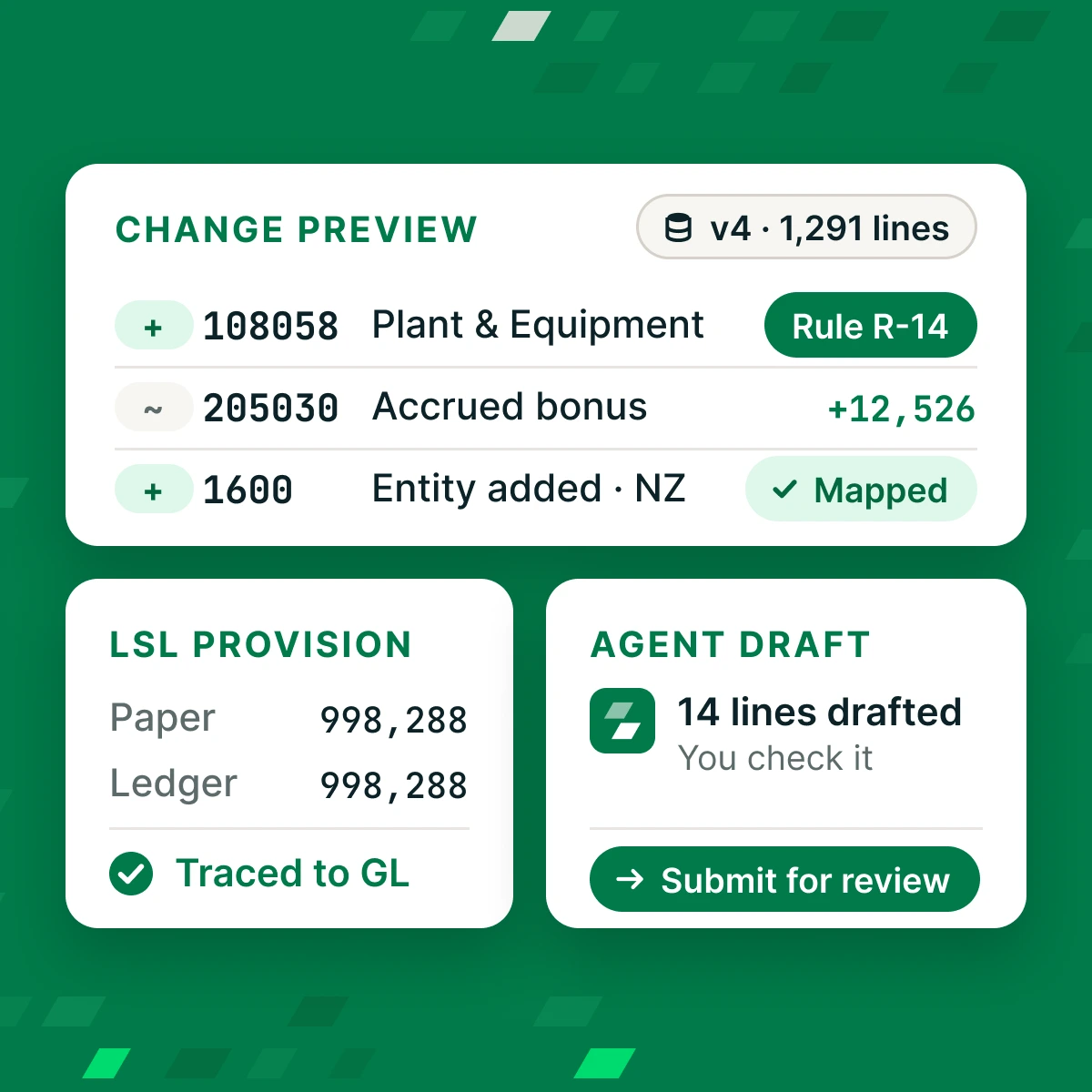
A GL load with change preview picking up a new account and a new entity, a workpaper that agrees to the Tax Ledger, and an agent draft ready to submit for review
Preparers

Build it once. Trace everything.

The close today

Export the GL, paste it into last year's workbook, fix what broke.

New accounts and new entities need new mappings, usually found when a total does not tie.

Versions live in email. The right one is whoever sent last.

Review notes come back as a list, against a spreadsheet nobody else can follow.

With TaxTime
✓

Load the GL with a change preview before anything is committed.

✓

Rules apply at GL level and pick up new accounts and entities on their own.

✓

Workpapers sit beside the Tax Ledger, and every figure links back to the lines behind it.

✓

Routine drafting goes to the AI agent. You check the work and submit for review from the same screen.

What they notice first: the period starts from last period's rules, not from a blank workbook.

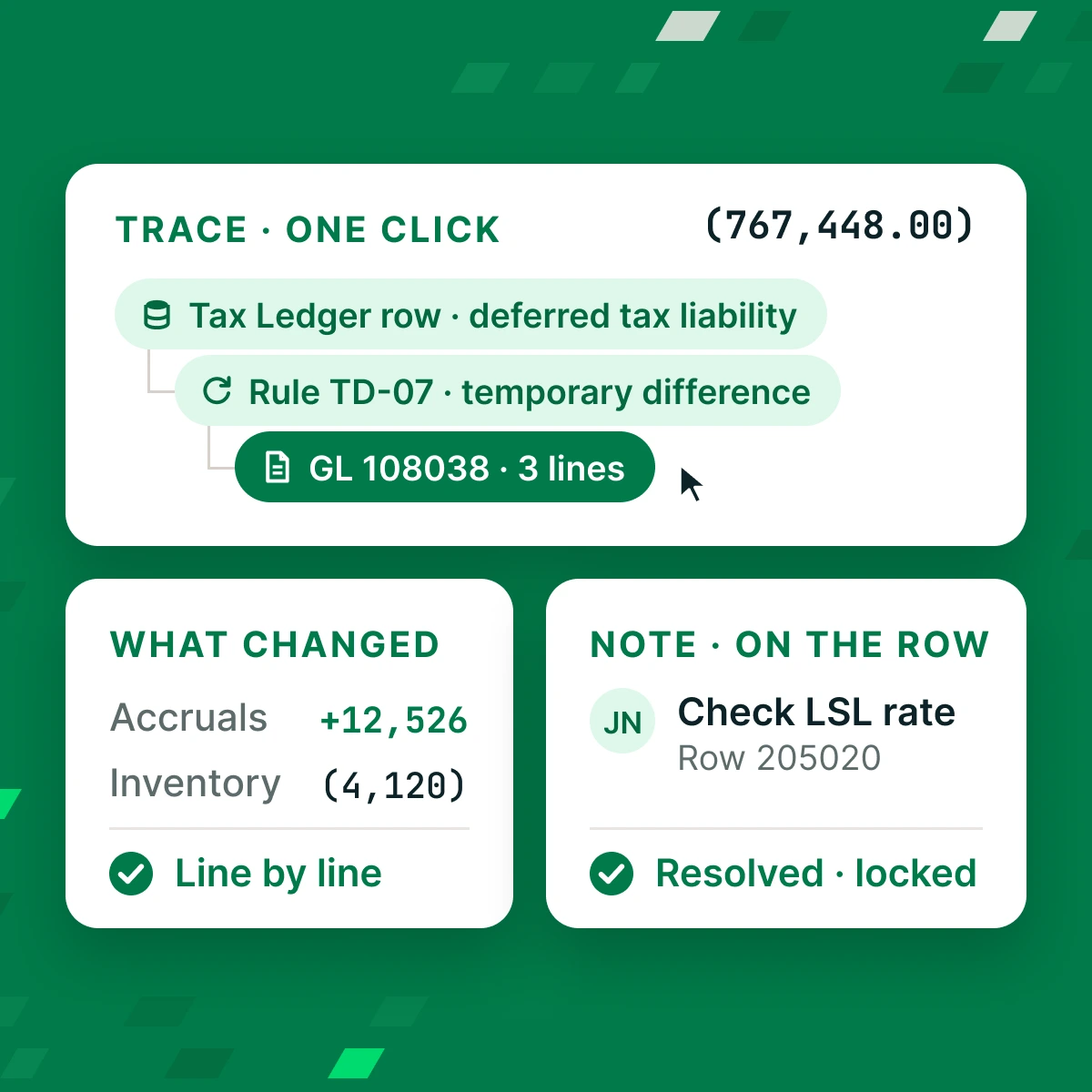
A deferred tax figure traced in one click from the Tax Ledger row to the rule and the GL lines, a line-by-line comparison with last period, and a review note resolved on its row
Reviewers

Review the number, not the spreadsheet.

The close today

The first hour goes on working out how a workbook you did not build hangs together.

A figure that looks wrong means a message to the preparer and a wait.

Comparing to last year is a second workbook open on a second screen.

Notes go in email, and the version you reviewed may not be the one that gets signed.

With TaxTime
✓

Click a figure and land on the GL lines, the rule and the adjustment behind it.

✓

Compare projects shows what changed since last period, line by line.

✓

Review notes sit on the row they are about, and you are notified when work moves to In review.

✓

Entities lock as they pass Reviewed, so what you reviewed is what gets signed.

What they notice first: fewer questions to the preparer, because the answer is one click away.

Sign-off status by entity with 14 of 18 signed off, a board-ready pack with positions, evidence and completeness checks, and an audit trail of who signed, drafted and reviewed
Heads of Tax

Sign off on evidence, not on trust.

The close today

The board asks a question and the answer is "I will come back to you."

Sign-off rests on the people, because the workings cannot be checked in the time available.

Justified Trust evidence is assembled after the fact, from files across the team.

Your best people spend the quarter processing instead of advising.

With TaxTime
✓

The dashboard shows every entity's status, Prepared to Signed Off, before anyone asks.

✓

Sign-off needs the permission, the confirmations and a signature, and the audit trail records every action by people and AI agents.

✓

The Head of Tax pack prints positions, evidence and its own completeness checks, so the board gets its answer in the meeting.

✓

The evidence pack for the ATO comes from the same Tax Ledger, not rebuilt for the review.

What they notice first: the close stops being the thing the team survives and becomes the thing the team runs.

When teams come to us

Six things that start the conversation

01

A Justified Trust review is coming

The ATO will ask where every number came from. The answer has to exist before the question.

How TaxTime supports a Justified Trust review
02

An ERP migration is under way

The best moment to stop carrying the old tax process forward with the old system.

Works with every ERP
03

A change of adviser

Transition pain is the moment to rethink the whole process, not just the firm.

How advisers work with clients on TaxTime
04

The board asks what AI is doing for tax

Too much of the team’s time goes on reconciling, chasing and re-keying. The real question is which of that an AI agent can take on, with the controls to prove it.

What an AI agent can take on: the AI in TaxTime page
05

Busy season broke someone

If one person stayed until 10pm to make the close happen, the process is the risk, not the person.

Key person dependency: the risk no one puts in the board paper
06

An acquisition adds entities

New entities, new GL accounts, new mappings. Rules absorb them. Spreadsheets don’t.

Several ERPs, one Tax Ledger: how new entities load

Not a fit yet: single entities, and teams that want an outsourced service rather than a platform of their own.

Everyone who touches the number

Six roles, one Tax Ledger

Preparers

Start from a reconciled position

Load the GL with a change preview before anything is committed. Rules apply at GL level and catch new accounts. Work in group or entity workpapers with the Tax Ledger beside you, then submit for review.

Preparers: GL loads, rules and workpapers in TaxTime
Reviewers

Review the twelve that matter, not three hundred

Exceptions are flagged instead of everything. Click any number for its provenance. Comments and information requests sit on the GL account they are about. Compare versions of workpapers, settings, the Tax Ledger and reports before you mark reviewed.

Reviewers: exceptions and provenance in TaxTime
Approvers

Sign with the evidence attached

Sign-off needs the permission, the confirmations and a signature. Entities lock as they move through Prepared, Reviewed and Signed Off. The Head of Tax pack prints positions, evidence and its own completeness checks, so the board gets its answer in the meeting.

Approvers: review and sign-off in TaxTime
Advisers

“I trust your data” instead of “send me everything again”

A login on request, with no contract amendment. Work in the client’s workspace, on the client’s Tax Ledger, with review points and evidence in one place. The platform and the data stay the client’s.

For advisers and audit firmsFor advisers and audit firms
Auditors

The trail is the evidence

Read access to the Tax Ledger. Drill from a disclosure to the GL line behind it. See who did what and when. The ATO Evidence Pack and the audit file come from the same place, so sample requests shrink.

Auditors: controls and Tax Ledger lineage
AI agents

A named user with the same roles

Connect your own AI agent through the TaxTime MCP. It reads the Tax Ledger, prepares and submits, and stops at judgement. Every action sits in the audit trail under its name, and it uses no extra licences.

See what an AI agent can doSee what an AI agent can do

Systems

Works with every ERP

TaxTime reads your general ledger, not your ERP. If a system can export a general ledger, TaxTime can load it, and several systems can load into one Tax Ledger.

SAP
SAP
Oracle
Oracle
Microsoft
Dynamics 365
Oracle NetSuite
NetSuite
Workday
Workday
TechnologyOne
TechnologyOne
OneStream
OneStream
Sage
Sage Intacct
Infor
Infor
Pronto Software
Pronto
Xero
Xero
Excel and CSV

Logos and product names are trademarks of their respective owners. Listing a system here doesn’t imply a partnership or endorsement.

See the full list and how a load works

See TaxTime on numbers like yours.

Start with a 30-minute call with Andrew or Jim about how your close runs today.