AI in TaxTime.
In the close, not in a chat window.

A Head of Tax sat through three vendor demos last month. Every demo started with the word AI. Every demo ended with a chat window. Here is what an AI agent can actually do when the platform underneath it was built for the job. It does the treadmill work. You make the calls.

The four levels

Most AI in other tax solutions sits at Level 1

Level 1

A chatbot over documents

Answers questions about what it has been given to read. It cannot see your numbers.

Level 2

One bounded task

Does a single job well, such as classifying accounts, then hands back to a person.

Level 3

A workflow assistant

Proposes an outcome inside one workflow for a person to accept or reject.

Level 4

Agentic tax operations

Works the whole close, end to end. Reads the structured Tax Ledger and the unstructured close around it: email, files, chat. Leaves a trail and stops at judgement. This is TaxTime with your own AI agent.

Read: The Four Levels of AI in Tax
Insourced AI or in-app AI?

Rent it or own it.

Most AI delivered through other tax solutions lives inside the app. It is quick to switch on, and it reaches that one app. A close runs through seven places, with a person behind each. Insourced AI is your own AI agent, connected to TaxTime through the MCP, and it reaches all seven. Ask four questions before you buy.

In-app AI
Rented. Lives inside one app.
Insourced AI, in TaxTime
Owned. Your AI agent, through the TaxTime MCP.
What can it reach?
One app, and the tax calculations inside it.
The whole close. Outlook, SharePoint, Teams, the ERP, Word and PowerPoint, and the Tax Ledger through the TaxTime MCP.
Who does it know?
The app’s users.
Your people. Who sends the trial balance, who reviews and who signs off, held in an instructions file your team owns.
Whose method does it follow?
The vendor’s, inside the vendor’s product.
Yours. Skill files your team writes, corrected after every review, so each close starts better than the last.
Who keeps the know-how?
The app. Rent it, and you depend on whoever sold it.
You. When someone leaves, the method stays, and there is no new dependency on a vendor or adviser.

How the TaxTime MCP works

Your AI agent works the close. TaxTime is where it acts.

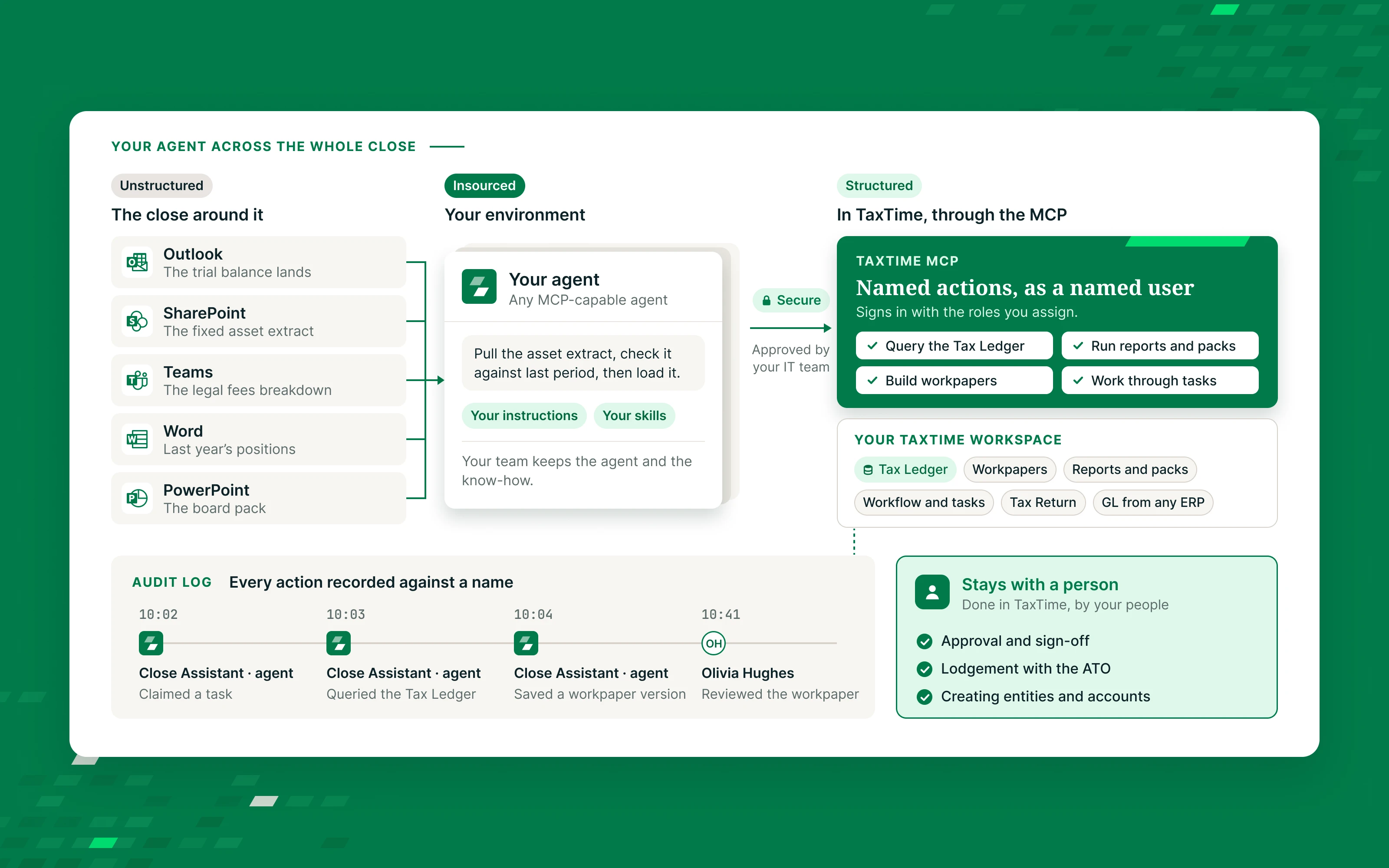
Your AI agent reaches the close with the access you give it: email, SharePoint, Teams and the ERP. In TaxTime it signs in as an authorised user with the roles you assign and calls named actions, and TaxTime records each one against the AI agent’s name.

Diagram: your own AI agent reaches the close in Outlook, SharePoint, Teams, Word and PowerPoint, and the structured Tax Ledger through the TaxTime MCP. Every TaxTime action is recorded against a name, and approval stays with people.
How the AI agent gets its work

The same queue as your team

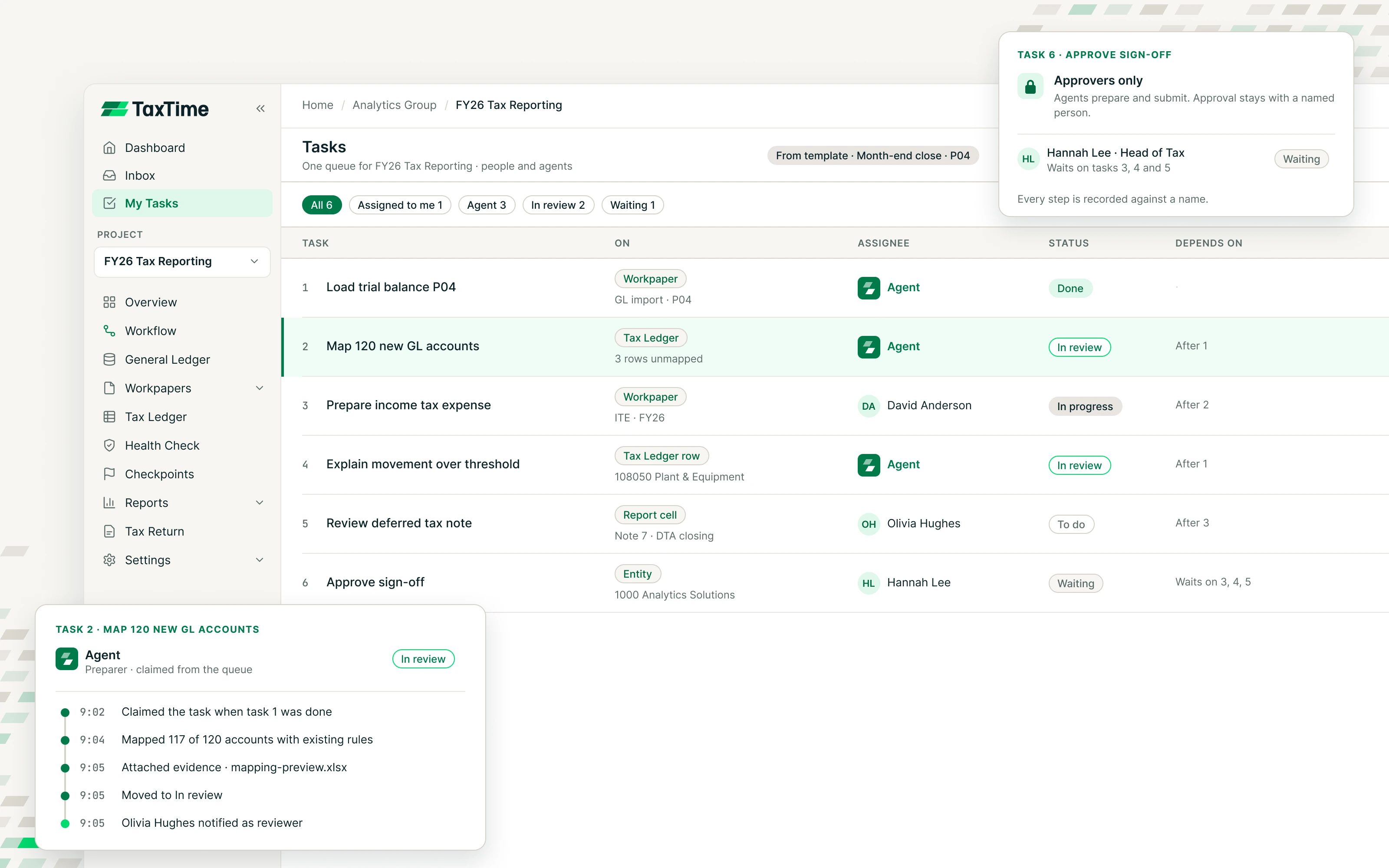
The AI agent takes its work from the same queue as your team. Every task in TaxTime sits on something real: a workpaper, a Tax Ledger row, a report cell. Ask your AI agent to work through its tasks and it claims each one, does the work, attaches the evidence and moves it to In review. The task is the scope, the status is the handoff, and the audit trail records both.

TaxTime task queue shared by people and the agent, with dependencies, reviewer notification and approval by a named person

Assigned in TaxTime

Assign a task to your AI agent or to a person. Ask your AI agent to work through its tasks and it picks them up through the MCP. Each period’s tasks come from your template, so the close never starts from a blank page.

Done in order

Tasks wait on the ones before them. The AI agent can only pick up a task once the work it depends on is done.

Approved by a person

When the AI agent moves a task to In review, the reviewer is notified. Approval is restricted by role, so an AI agent can prepare but never approve.

What you can ask

Real questions, answered from the Tax Ledger

“Which entities have unmapped accounts this period?”

“Draft the deferred tax journal for Entity X and show me the workpaper lines.”

“Run the Head of Tax pack for the statutory hierarchy and list every check that fails.”

“Compare FY26 to FY25 on the Taxable Income report and explain the three biggest movements.”

Outputs

Work your reviewers can sign

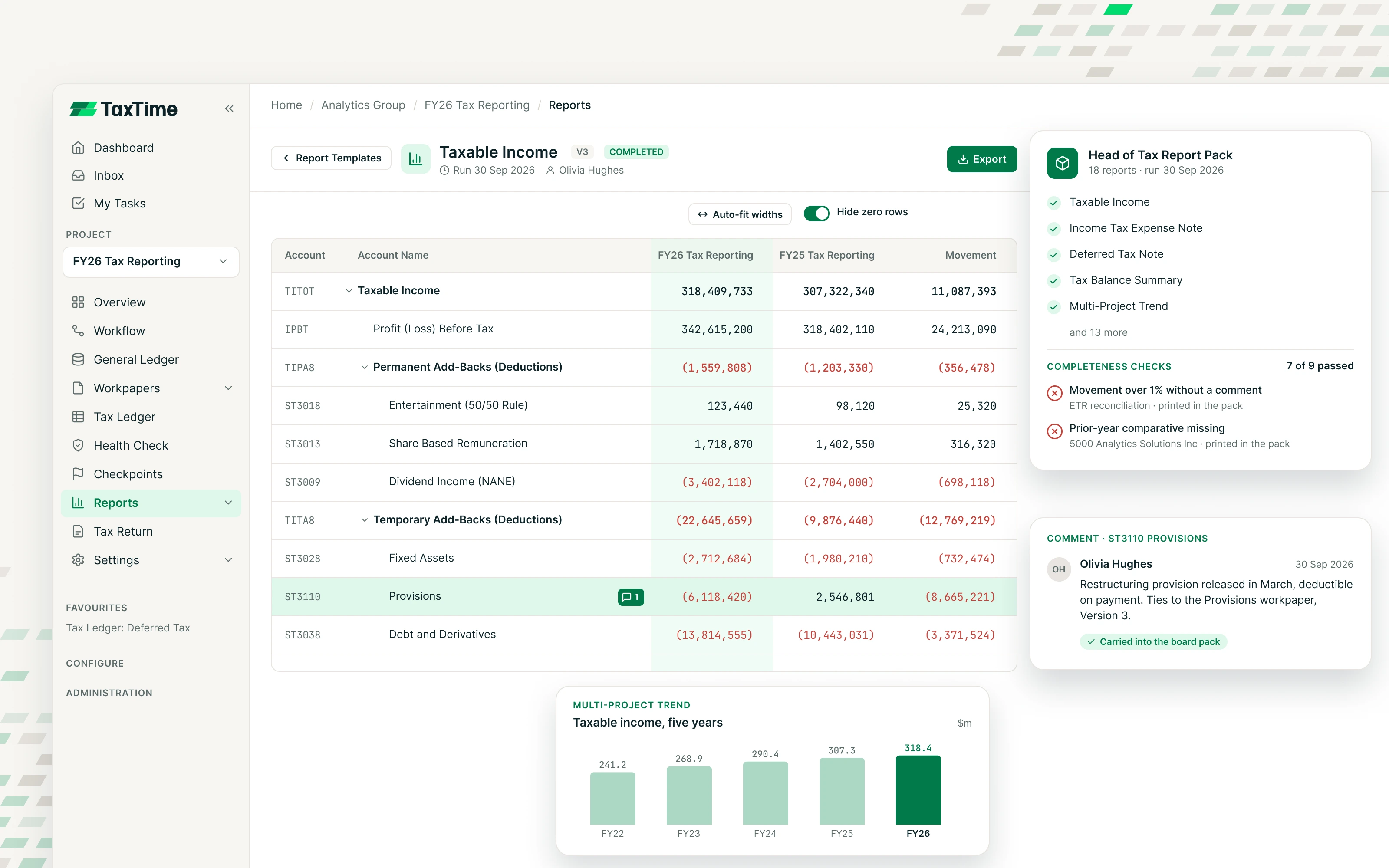
The Head of Tax report: positions, evidence, Justified Trust readiness and the FY-on-FY comparative, assembled from the pack. The board pack that grades its own completeness and prints the fails.

TaxTime reports with a comparative view against the prior year and a report pack ready to run
Safeguards and getting connected

Your AI agent is your user

You set the roles.

You choose the roles, you own the AI agent’s configuration, and TaxTime secures the service it connects to. Data stays in Australia.

People keep judgement.

Creating entities, approval, sign-off and lodgement stay with people, in the TaxTime screens.

Connected in a working session.

Included in Enterprise Excellence. Your IT and security team approves the connection. We connect the AI agent with you and hand your team reusable skills, so nobody becomes the only person who knows how.

See TaxTime on numbers like yours.

Start with a 30-minute call with Andrew or Jim about how your close runs today.